Questions? Call Us: 336-485-6199

Loading...

Break Bell System Automatic Web-Based Bell Timer Software Expandable for School Factory Warehouse 2 Outputs - Netbell-K-M2

$868.00

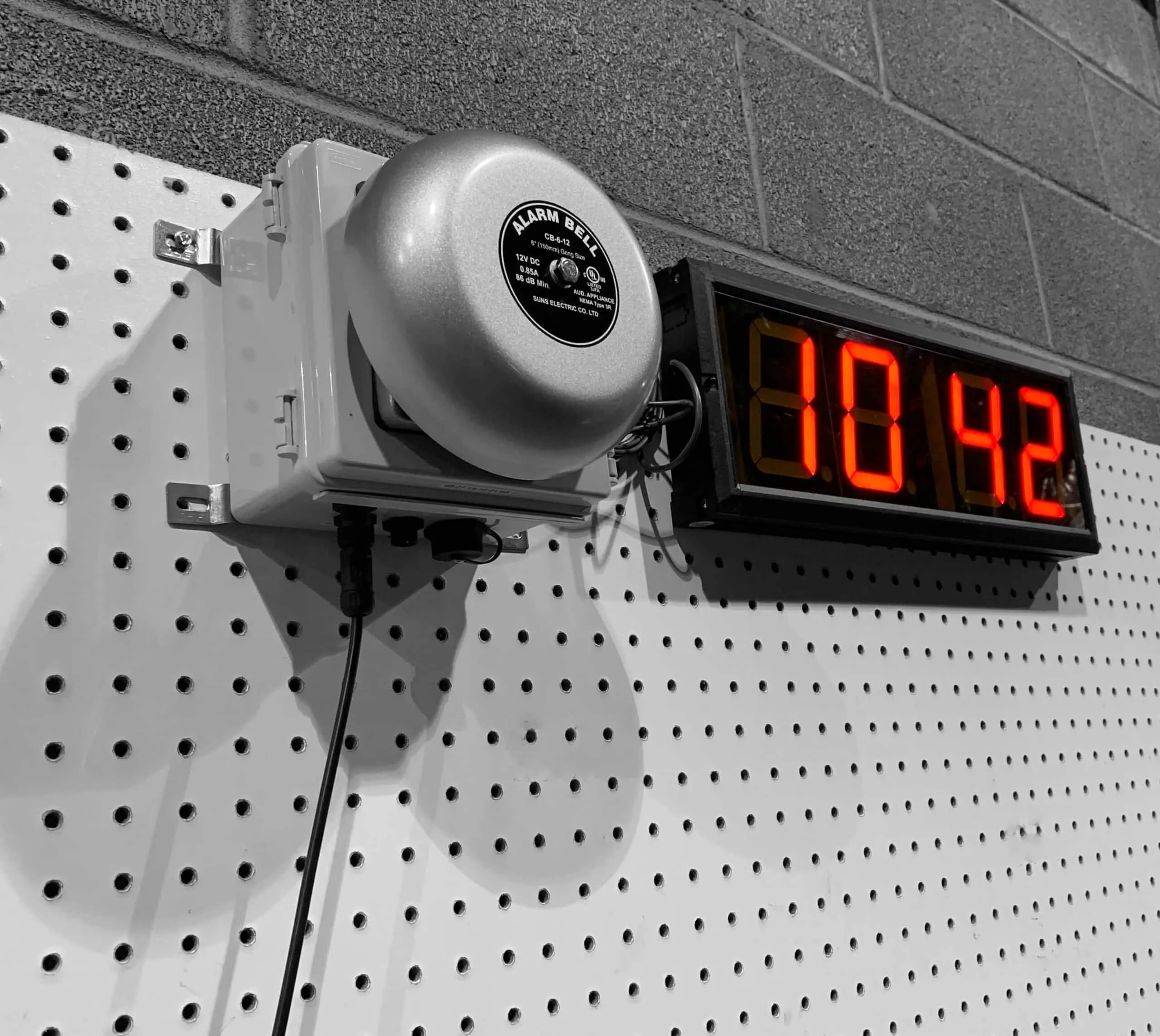
Netbell-K features a built-in high quality 6-inch high output bell (>= 86dBa), and a completely wired web-based bell controller installed within a NEMA-rated box. There aretwo additional bell (relay) outputs (Dry Contact, 1-Form-A relay 30VDC@8A, 48VAC@8A Max)) that can be used to connect additional two bells if you have a larger area needs to be covered.

Need more bells or different options such as a digital clock? Build your complete system → Netbell-K Custom Bell System Builder

Overview

The Netbell-K-M2 is an all-in-one automatic bell system for schools, factories, and warehouses, with two external bell outputs that let you add up to two more bells and cover a larger area as your facility grows. It comes fully wired in a NEMA-rated box with a built-in 6-inch high-output bell (≥ 86 dBA) and a web-based bell controller – all software and mounting hardware included. Built on a TCP/IP platform with a built-in web server, it lets you access, control, and schedule bells from any browser over the network or Internet, with no additional software and no dedicated computer required. With the digital inputs you can wire a push switch to ring bells manually in an emergency. It’s an affordable, expandable way to replace an old bell timer with a modern school bell system or warehouse bell system.

The Key Features

  • EXPANDABLE BELL SYSTEM – All-in-one automatic bell system with a built-in 86 dB bell plus two external bell outputs, so you can add bells and grow coverage as your facility expands.
  • SCHEDULE FROM ANY BROWSER – Program up to 500 bell events on weekday or calendar schedules from any browser; no software and no monthly fees.
  • COVERS 8,000+ SQ FT – Built-in bell covers up to 8,000 sq ft; add external bells on the two extra outputs to cover larger areas.
  • EMERGENCY-READY – Wire a push switch to ring bells manually for lockdowns, fire drills, or other emergencies.
  • MADE IN THE USA – All-in-one box with controller, bell, and hardware; designed, built, and supported in the USA.

How It Works

  • Wire your external bell to the power supply (the built-in bell is already wired).
  • Connect up to two externals bell to the Netbell-K-M2 controller if needed.
  • Power the unit and connect it to your network – it can go anywhere on your network, no direct PC connection needed.
  • Add bell schedules from a standard web browser (or the free BellScheduler desktop app) – up to 500 events.

What’s in the Box

  • One Netbell-K-M2 SERVER
  • One power cable/RJ45 network cable
  • One 12VAC power supply
  • Wall mounting brackets and hardware

10M/100M RJ45 Internet interface with connection and activity LEDs
• Status LEDs (pulse, bootloader, and locate)
• Ethernet Bootloader (for server hardware code upgrade)
• Power: 12VAC (power supply provided)
• Bell: 6" Inch 12 Volt DC/Die Cast Aluminum Enclosure, Volume: >= 86Db, IP24 Rated
• Enclosure: ABS, IP67 /150mm x 150mm x 90mm (Mounting hardware supplied)
• Accessories: 3 Meters Power Cable/3 Meters RJ45 Network Cable
• External Bell Output: Dry Contact, 1-Form-A relay 48VAC@8A Max
• On board temperature sensor and input voltage sensor
• Working Temperature from 0 to +65 Celsius
• Storage Temperature from -40 to +125 Celsius
• Humidity from 10% to 80% non-condensing
• Dimensions 74mm x 100mm x 20mm, mounting holes 64mm x 92mm Ф 3.2mm 4 places
• Supported Protocols: HTTP/SMTP/SNTP

Download the Documentation

Netbell-K -Packing-List-and-Wiring-Instructions.pdf
Netbell Quick Setting Instruction
Netbell-User-Manual.pdf
Use-Push-Switch-To-Ring-Bell-Manually-for-Emergency.pdf

Software Configuration

Download the Discover app to find the IP address on your network

Download the Discover App for Windows from the link below (the file is a ZIP file – please extract after downloading):

Linortek Discover for Windows

Alternatively, you can download the Java-based Discover program if you believe you have the Java runtime installed on your PC, you can download the Java-based Discover program here (the file is a ZIP file – please extract after downloading):
Linortek-TCPIP-Discoverer.zip

Download the Netbell BellScheduler Desktop App and Instructions

If you own one Netbell device, it will be easy to add bell schedules from the webpage of your device. However, if you have multiple Netbell devices, you can use our free BellScheduler desktop app to add bell schedules from a single interface.

Netbell-BellScheduler-Desktop-App-Setting-Instruction.pdf Netbell-BellScheduler.zip

Video Tutorials

How to wire an external bell to the Netbell-K
Finding the IP address using the Discover program
Netbell Software Initial Setup – Basic Settings
How to Use the Netbell BellScheduler Desktop App
Reset to Factory Default

FAQs

General Questions
Network Questions
Netbell Configuration Questions

People Also Love

Related Products

The Netbell-KB-E2M is a compact, self-contained design that was created with ease-of-use in mind. Intended to be an all-in-one solution,...
$1,924.00
An IP-based overhead paging system for schools, and other facilities that can be used for emergency alerts, break time scheduling,...
Price range: $334.00 through $1,319.00
An IP-based overhead paging system for warehouses, factories, schools, and industrial facilities that can be used for emergency alerts, break...
Price range: $334.00 through $1,319.00
A network-enabled, cost-effective industrial paging system designed for manufacturing facilities, distribution centers, and industrial warehouses requiring consistent break timing and...
Price range: $334.00 through $1,319.00
The Netbell-4-4Buz includes everything needed for factories, industrial facilities, warehouses to build a fully automated web-based timed alert system for...
$2,332.00
The Netbell-4-4Bell is a one-stop solution for schools, factories, industrial facilities, warehouses to build a fully automated web-based timed alert...
$1,892.00